How to Hash a Password with bcrypt in Python
2026-06-24 · Updated 2026-06-25 · 6 min read
Figure 1: Hashing a password with bcrypt in Python
Never store passwords as plain text or as a fast hash like MD5 or SHA-256. bcrypt is the proven choice for password storage: it is deliberately slow, it salts every hash automatically, and you can raise its cost as hardware gets faster. This guide shows how to use it in Python.
You can run the examples in the free Python Executor playground.
Install bcrypt
bcrypt is not in the standard library, so install it with pip:
pip install bcryptHash a password
bcrypt works on bytes, so encode your password first. gensalt generates a random salt (with a cost factor), and hashpw produces the hash.
import bcrypt

password = "S3cur3P@ss".encode("utf-8")

hashed = bcrypt.hashpw(password, bcrypt.gensalt(rounds=12))
print(hashed)
# b'$2b$12$....'  (60 characters, different on every run)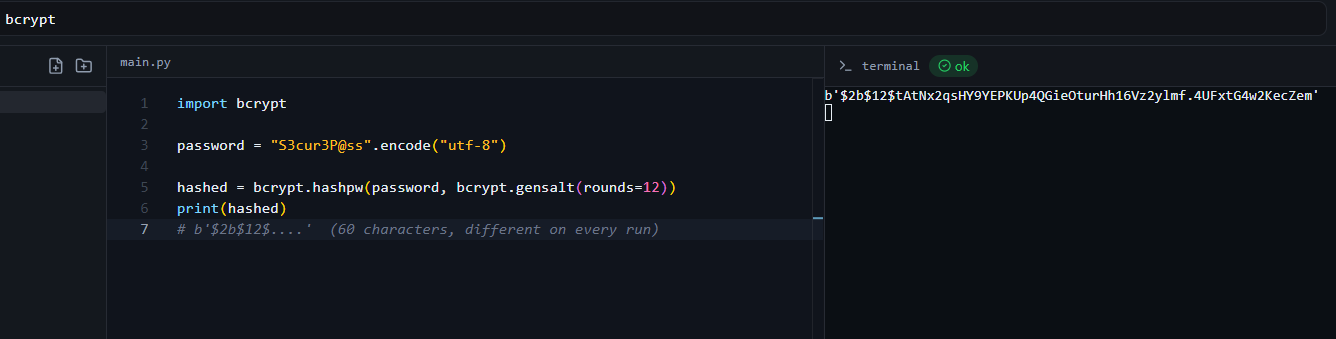
Figure 2: A 60-character bcrypt hash in the online compiler (it differs on every run)
Run it twice and you get two different hashes for the same password, that is the random salt doing its job.
Verify a password on login
You never "decrypt" a bcrypt hash. Instead you let bcrypt re-hash the attempt with the stored salt and compare, using checkpw.
import bcrypt

# In real life this comes from your database, stored as bytes
stored = bcrypt.hashpw(b"S3cur3P@ss", bcrypt.gensalt(rounds=12))

print(bcrypt.checkpw(b"S3cur3P@ss", stored))   # True
print(bcrypt.checkpw(b"wrong-password", stored))  # False
checkpw reads the salt and cost straight out of the stored hash, so you do not need to store them separately.
Storing and loading the hash
hashpw returns bytes. Decode to a string for a text database column, and encode back to bytes before calling checkpw.
import bcrypt

hashed = bcrypt.hashpw(b"S3cur3P@ss", bcrypt.gensalt())
to_store = hashed.decode("utf-8")    # store this string in your DB
print(to_store)

# later, on login:
ok = bcrypt.checkpw(b"S3cur3P@ss", to_store.encode("utf-8"))
print(ok)   # True
Understanding the bcrypt hash format
A bcrypt hash is self-contained, the algorithm, cost and salt all live inside the 60-character string:
$2b$12$eImiTXuWVxfM37uY4JANjQ....
 |  |  |                     |
 |  |  |                     +-- 31-char hash
 |  |  +------------------------ 22-char salt
 |  +--------------------------- cost factor (2^12 rounds)
+------------------------------ algorithm version (2b)| Part | Example | Meaning |
|---|---|---|
| Version | $2b$ |
bcrypt variant |
| Cost | 12 |
2^12 key-expansion rounds |
| Salt | 22 chars | unique random salt |
| Hash | 31 chars | the derived hash |
Because the salt is embedded, you store just this one string, no separate salt column needed.
Choosing the cost factor
Higher cost means slower hashing, which is good against attackers but adds latency for users. gensalt defaults to 12 rounds, a reasonable choice in 2026. Benchmark on your hardware and aim for roughly 250 ms per hash, and raise the cost over time as machines get faster.
A note on bcrypt's 72-byte limit
bcrypt only uses the first 72 bytes of the input. If you allow very long passwords, pre-hash with SHA-256 first, then bcrypt the result:
import bcrypt, hashlib, base64

password = b"a very long passphrase that may exceed seventy-two bytes ........"
prehashed = base64.b64encode(hashlib.sha256(password).digest())
hashed = bcrypt.hashpw(prehashed, bcrypt.gensalt())
print(hashed)
Generate or inspect a bcrypt hash online
To check what a $2b$ hash is, or generate one for testing, use the KeyDecryptor bcrypt tool in your browser.
Frequently Asked Questions
Can you decrypt a bcrypt hash?
No. bcrypt is a one-way password hash, not encryption. You verify a password by hashing the attempt with the stored salt and comparing, using bcrypt.checkpw.
Why is the hash different every time I run it?
gensalt generates a new random salt on each call, so the same password produces a different hash each time. That is exactly what defeats precomputed (rainbow-table) attacks.
Do I need to store the salt separately?
No. The salt is embedded in the 60-character hash string, so you store only that one value.
Why do I get a "TypeError: Unicode-objects must be encoded" error?
bcrypt works on bytes. Call .encode("utf-8") on your password (and on the stored hash before checkpw) first.
What cost factor should I use?
Start around 12 (the gensalt default) and tune it so a single hash takes roughly 250 ms on your production hardware. Increase it as hardware improves.
Is bcrypt better than SHA-256 for passwords?
Yes. SHA-256 is fast, which helps attackers brute-force it. bcrypt is deliberately slow and salted, which is what you want for passwords. (scrypt and Argon2 are also good modern choices.)