How to Base64 Encode and Decode in Python
2026-06-24 · Updated 2026-06-25 · 5 min read
Figure 1: Base64 encoding and decoding in Python
Base64 is one of the most common ways to turn binary data into plain text so it can travel safely through systems that only expect text, such as JSON, URLs, email and HTTP headers. Python ships with everything you need in the standard library, so you do not have to install anything.
You can run every snippet in this guide in the free Python Executor playground without any setup.
Base64 in one minute
Base64 takes 3 bytes (24 bits) and represents them as 4 printable characters drawn from A-Z, a-z, 0-9, + and /. When the input length is not a multiple of 3, the output is padded with =.
One important thing to understand up front: Base64 is encoding, not encryption. It has no key and anyone can reverse it. Never use it to hide secrets.
Encode a string to Base64
The base64 module works on bytes, not str. So you encode your text to bytes first (UTF-8 is the safe default), then call b64encode.
import base64

message = "Hello, KeyDecryptor!"

encoded_bytes = base64.b64encode(message.encode("utf-8"))
print(encoded_bytes)          # b'SGVsbG8sIEtleURlY3J5cHRvciE='

# Turn the bytes back into a normal string for display/storage
encoded_str = encoded_bytes.decode("ascii")
print(encoded_str)            # SGVsbG8sIEtleURlY3J5cHRvciE=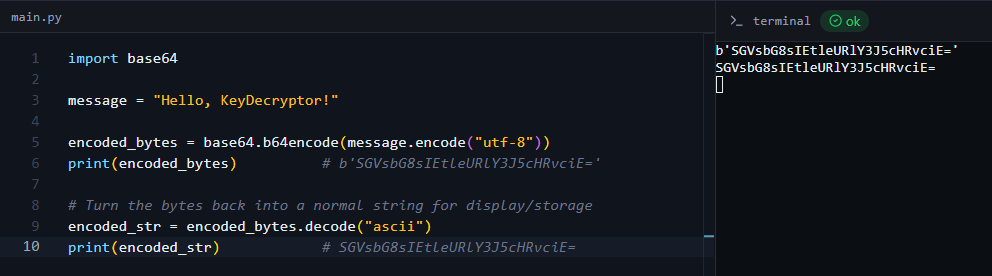
Figure 2: Encoding a string to Base64 in the online compiler
Decode Base64 back to text
b64decode reverses the process and gives you bytes back. Decode those bytes to a string to read the original text.
import base64

encoded = "SGVsbG8sIEtleURlY3J5cHRvciE="

decoded_bytes = base64.b64decode(encoded)
print(decoded_bytes)              # b'Hello, KeyDecryptor!'
print(decoded_bytes.decode("utf-8"))  # Hello, KeyDecryptor!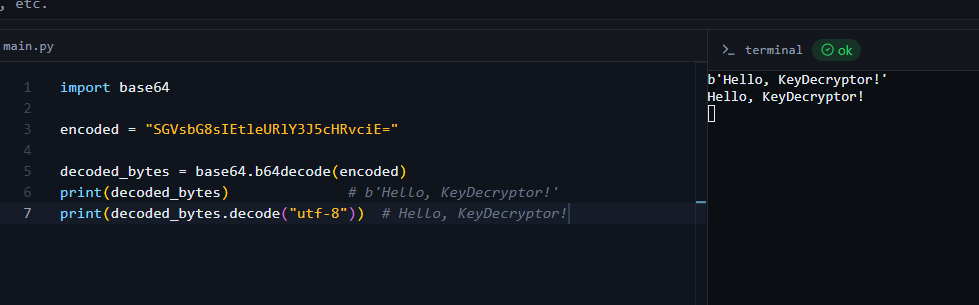
Figure 3: Decoding Base64 back to text
URL-safe Base64
Standard Base64 uses + and /, which have special meaning inside URLs and file names. The URL-safe variant swaps them for - and _. Use urlsafe_b64encode and urlsafe_b64decode when the value will appear in a URL, a JWT, or a query string.
import base64

data = b"\xfb\xff\xbf"   # bytes that produce + and / in standard Base64

print(base64.b64encode(data))          # b'+/+/'
print(base64.urlsafe_b64encode(data))  # b'-_-_'
Encode and decode a file
Because Base64 works on bytes, encoding a file (an image, a PDF, anything) is the same call, you just read the file in binary mode first.
import base64

with open("logo.png", "rb") as f:
    file_b64 = base64.b64encode(f.read()).decode("ascii")

# ... later, write it back out
with open("logo_copy.png", "wb") as f:
    f.write(base64.b64decode(file_b64))
This is exactly how images get embedded as data: URIs in HTML and CSS.
Common errors and how to fix them
| Error | Cause | Fix |
|---|---|---|
TypeError: a bytes-like object is required |
You passed a str to b64encode |
Call .encode("utf-8") first |
binascii.Error: Invalid base64-encoded string |
Wrong characters in the input | Strip whitespace/newlines before decoding |
binascii.Error: Incorrect padding |
Missing = padding |
Add padding (see below) |
To fix missing padding when you receive an unpadded Base64 string:
import base64

def decode_fix_padding(s: str) -> bytes:
    s = s.strip()
    s += "=" * (-len(s) % 4)   # restore padding to a multiple of 4
    return base64.b64decode(s)
Decode Base64 online (no code)
If you just need a quick answer without writing Python, paste your value into the KeyDecryptor Base64 Encoder and Decoder. It runs entirely in your browser.
Frequently Asked Questions
Is Base64 encryption?
No. Base64 is encoding, not encryption. There is no key, and anyone can decode it instantly. Never use it to protect passwords or secrets.
Why does my Base64 output start with b'?
That b'...' is Python's way of displaying a bytes object. Call .decode("ascii") on the result to get a normal string.
What causes "Incorrect padding" errors?
The input length is not a multiple of 4 because the = padding was stripped. Re-add padding with s += "=" * (-len(s) % 4) before decoding.
When should I use URL-safe Base64?
Whenever the encoded value goes into a URL, query string, file name or JWT. It replaces + and / with - and _ so the value is not misinterpreted.
How do I Base64 encode an image in Python?
Open the file in binary mode ("rb"), read it, and pass the bytes to base64.b64encode. The result is the same text you would embed in a data: URI.